Your phone knows when to be quiet.
Lets Mute silences your Android automatically — by timer, schedule, location, calendar, or Wi‑Fi — and turns the sound back on when you're done. Set it once, forget it forever.
Three steps. Then never think about it again.
Set a rule
Pick a trigger: a timer, a schedule, a place, an event, or a Wi‑Fi network.
Your phone mutes itself
The moment the rule matches, no taps needed.
Sound comes back automatically
Your previous mode is restored the instant the rule ends.
Every way your phone should go quiet.
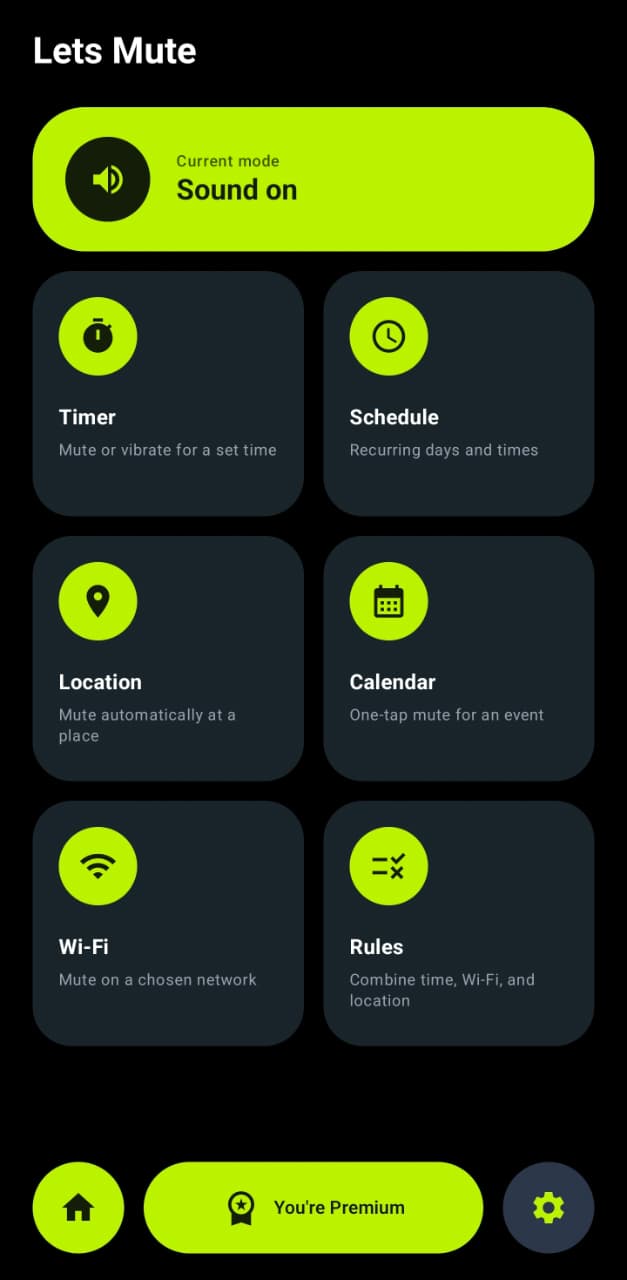
Five triggers, one rules engine — and your previous sound mode always comes back when a rule ends.
Timer
Mute or vibrate for a set time. Sound restores automatically, with a notification showing exactly when — cancel any time from the shade.
Schedule Pro
Recurring days and times. Silent every weeknight, vibrate during work hours — it just happens.
Location zones Pro
Mute automatically when you arrive at a place, unmute when you leave. Zones with an adjustable radius.
Calendar
One-tap mute for a calendar event. Your phone stays silent exactly as long as the event lasts.
Wi‑Fi rules
Mute on a chosen network. Connect to office Wi‑Fi, phone goes quiet — automatically.
Rules engine
Combine time, Wi‑Fi, and location in a single rule, with priorities when rules overlap.
One rule. Every condition.
Stack a schedule, a Wi‑Fi network, and a location zone into a single rule. When they all match, your phone goes quiet — and when rules overlap, the priority you set decides which one wins.
From meeting start to silent — and back to sound on when it ends. Once a rule is set, your ringer runs itself.
Five triggers. One quiet phone.
Timer, schedule, location, calendar, and Wi‑Fi — combine them freely with the rules engine.
Private by design.
Never reads your notifications.
Do Not Disturb access is only used to change the sound mode — nothing else.
Doesn't track or store your location.
Location permission exists only because Android requires it to read Wi‑Fi network names and run geofences. Nothing leaves your phone.
No account needed.
Premium is tied to your Google Play account — we never see your data.
Hear from what users are saying
Review placeholder — paste a real quote from your Google Play listing here.
Review placeholder — a longer quote can go in this card. Two or three sentences fit comfortably, so pick one that tells a story about schedules, meetings, or location zones.
Review placeholder — paste a real quote from your Google Play listing here.
Review placeholder — a medium-length quote works well here to vary the rhythm of the grid.
Review placeholder — paste a real quote from your Google Play listing here.
Review placeholder — paste a real quote from your Google Play listing here.
Placeholder cards — swap in real quotes from your Play Store reviews before launch.
Start free. Upgrade when you need more.
Free
Everything you need to get started.
- Timer
- Calendar day view
- Wi‑Fi rules for 1 network
- Up to 3 rules
Premium Pro
Monthly or yearly — free trial included.
- Unlimited rules
- Unlimited Wi‑Fi networks
- Recurring schedules
- Location zones
- Week & month calendar views
Subscriptions renew automatically until cancelled in Google Play. Cancel anytime. If your subscription lapses, nothing is deleted — premium rules simply pause and resume when you re-subscribe.
Fast responses to your questions
Why does Lets Mute need Do Not Disturb access?
Android requires this permission for any app that changes the sound mode. Lets Mute uses it only to switch between sound, vibrate, and silent — it never reads your notifications.
Why does a Wi‑Fi feature ask for location permission?
Android only shares which Wi‑Fi network you're connected to with apps that have location permission. Lets Mute doesn't track or store your location — it only reads the network name to match your rules.
What happens if my Premium subscription lapses?
Nothing is deleted. Rules that use Premium features simply pause, and everything comes back the moment you re-subscribe.
Will rules trigger reliably in the background?
Yes — for best reliability, exclude Lets Mute from battery optimization when the app prompts you. Rules also survive a phone restart.
What if two rules overlap?
You set rule priorities, so the rule you care about most always wins.
Is there an iPhone version?
Not yet — Lets Mute is Android-only for now. iOS doesn't allow apps to change the ringer mode the way Android does.
Set it once. Forget it forever.
Get Lets Mute on Google Play and let your phone handle the quiet parts of your day.
Get it on Google Play